Learn More
The Spectra360 Workflow
Using Spectra360 in a Practical, Film-Inspired Workflow
Spectra360 is designed to be used the way film was traditionally handled: get the capture into the right “negative” range first, shape the image while it’s still “negative-aware,” then let the print stage finalize the image. The difference is that you’re doing it in a modern digital environment—faster, repeatable, and with far more control—while still following the logic of a photochemical pipeline.
Just as importantly, Spectra360 was built to be easy to use. The workflow is intentionally structured so that you don’t need to be a full-time colorist to get professional results. The node order and tools are designed to feel logical, with clear stages that guide you through the process so filmmakers & editors can get a high-end grade foundation quickly, and experienced colorists can still push it much further when needed.
The Photochemical Logic (In Digital Terms)
A classic film pipeline is essentially:
Camera Negative (what’s captured)
Timing / Printer Lights (balancing exposure and color before printing)
Print (the finishing response that makes it “cinema”)
Projection (the final viewing experience)
Spectra360 mirrors this structure:
Input normalization → ensures footage behaves like the reference camera the film response
was built on
Exposure placement → puts the scene into the negative’s usable range
Negative emulation → establishes the film stock’s core response
Pre-print creative work → your “timing” and look-building stage
Print emulation → the final film print character
Grain / halation finishing → perceptual finishing that reads best at the end of the chain
Once you internalize that, the workflow stops feeling complicated. It becomes a repeatable way to get a filmic result—without needing to “invent” a look from scratch.
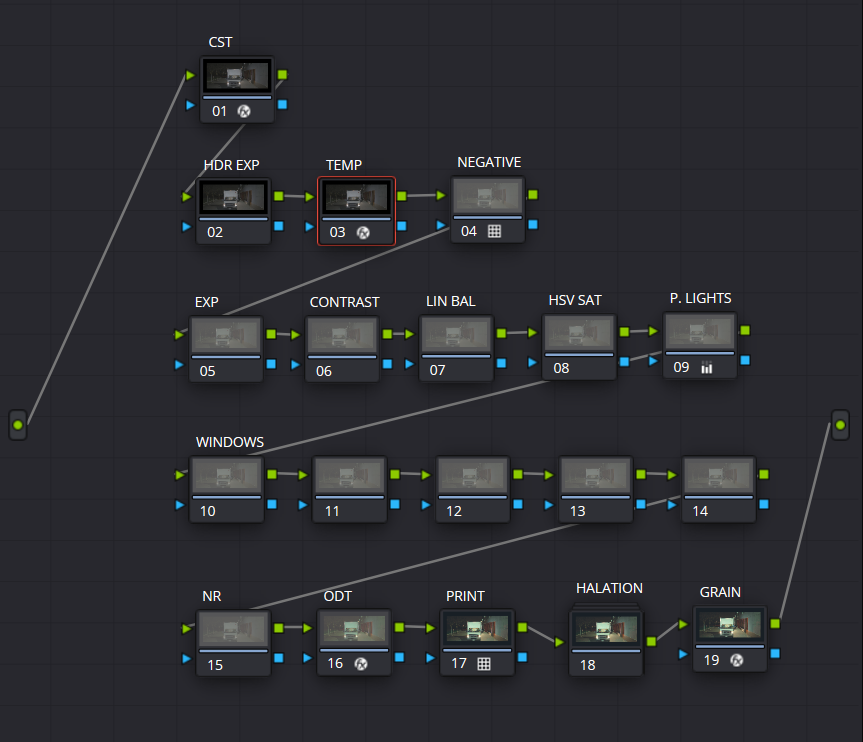
A detailed PDF is included with Spectra360 Pre Order once purchased, walking through the full workflow step by step from setup to final output. In addition, YouTube tutorials will be released to demonstrate the process on real footage, so anyone can follow along and get consistent results quickly.